Structured Asset Data Requirements for DCIM-Ready BIM Handoff
Missing asset data at handoff means operations gets a drawing, not a working registry.
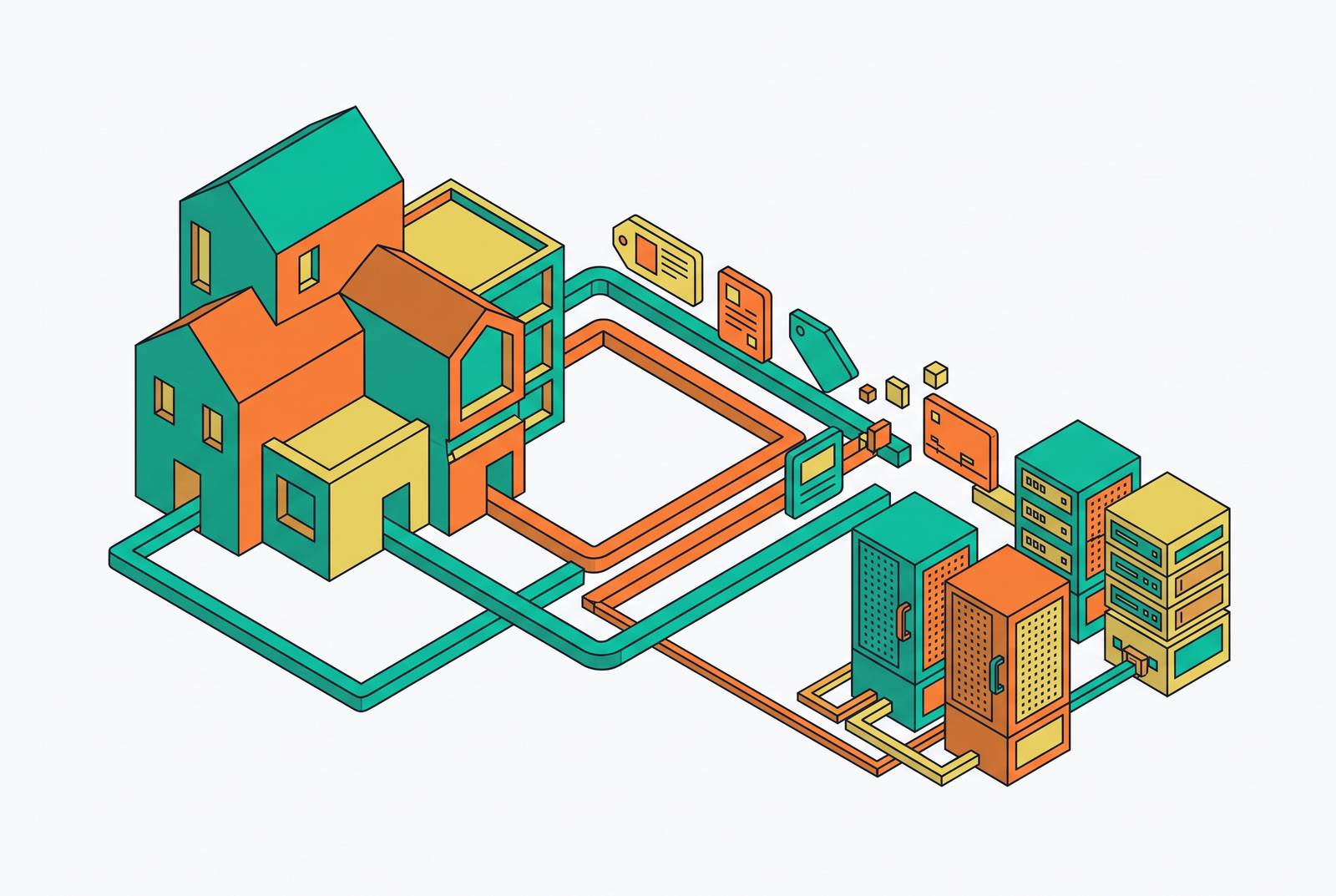
A BIM model earns the label "DCIM-ready" when every asset in it carries structured data: power draw, nameplate ratings, connectivity, spatial location, operational identifiers. Miss any of those at handoff, and operations doesn't get a working asset registry. They get a drawing set that starts going stale the day commissioning ends, and nobody notices until the first outage hits.
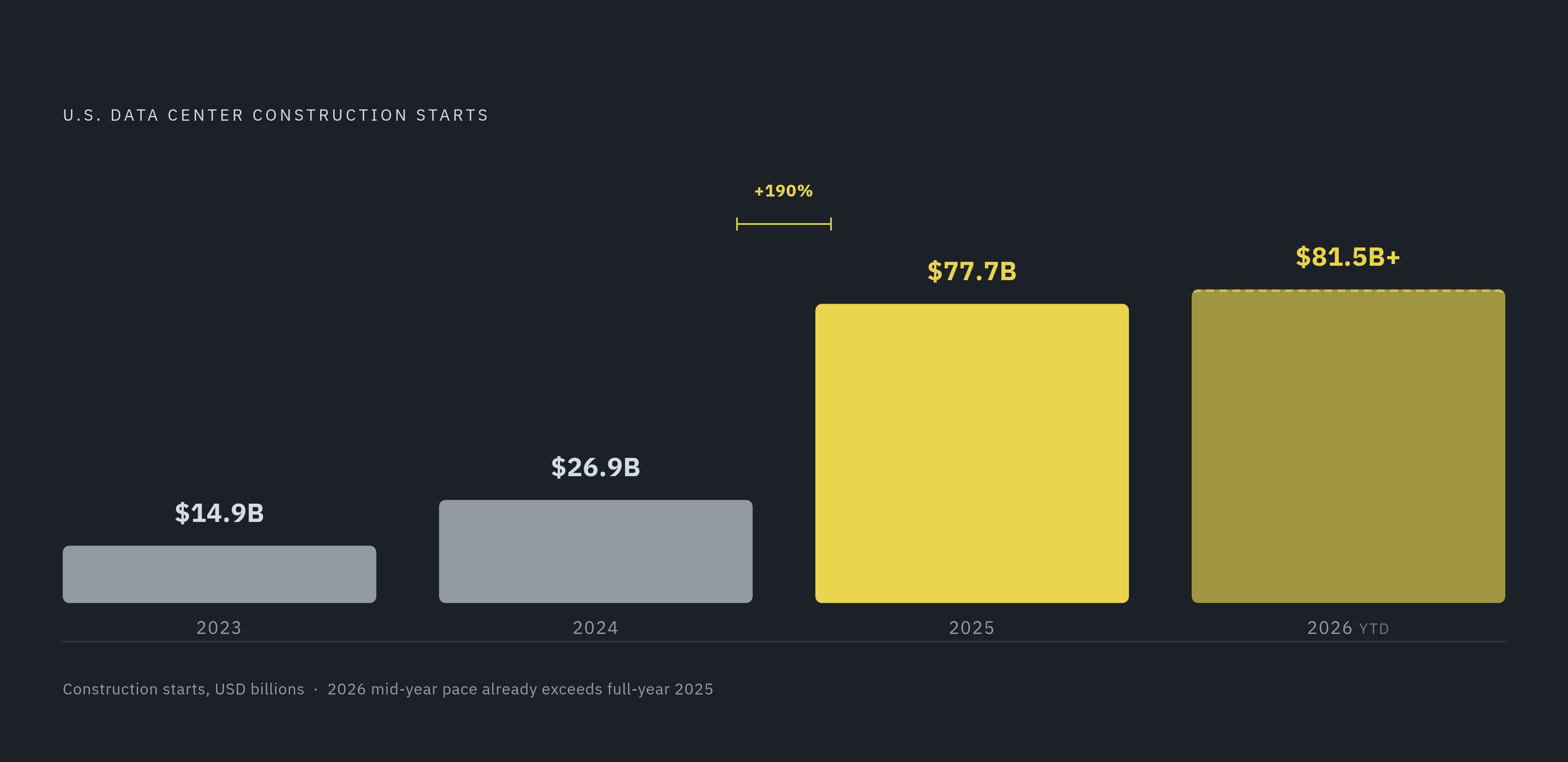
The money involved makes this worse, not better. U.S. data center construction starts went from $14.9 billion in 2023 to $26.9 billion in 2024, then to $77.7 billion in 2025, a 190% jump. By mid-2026, year-to-date starts had already topped $81.5 billion, more than all of 2025 combined. Facilities are getting bigger too, averaging close to 700,000 square feet by Q2 2026, nearly double the size from a few years back. Standard builds run well into the millions per megawatt now, and AI-ready facilities push past $20 million. At that price, a week lost to bad or missing asset data costs something real.
What actually breaks when BIM data doesn't reach DCIM intact
I've watched this happen enough times to know the pattern by heart. By the time operations gets the keys, the as-built information is already stale. It shows up as PDFs and spreadsheets, disconnected from whatever actually got installed on the floor.
Here's what that looks like day to day. Someone has to fill in DCIM by hand, one asset at a time, re-keying nameplate data, connectivity, and location off paper records dug out of a binder somewhere. There's no validated power chain from the utility entrance down to the rack, so operators can't tell you how much capacity is left without walking the site and checking with their own eyes. Connectivity, which port feeds which rack, which circuit feeds which PDU, lives in an installer's notebook or in somebody's memory. That somebody eventually leaves the company. Maintenance schedules can't even get built until every asset has been found and tagged by hand first.
DCIM used to just track assets. Now it's supposed to model capacity and resiliency ahead of time, forecasting what happens if a UPS fails or a rack gets added. It can only do that work if what it starts with is complete, not pieced back together weeks later by a guy with a clipboard.
Virtual commissioning, checking airflow, power distribution, and cooling capacity in the model before a single server gets racked, depends entirely on that data thread surviving from design through construction. In theory, sensor data and asset tags set up during construction flow straight into DCIM without anyone typing anything twice. In practice, it rarely goes that way, and the gap is where most teams burn through weeks of commissioning time they never budgeted for.
The asset data fields DCIM actually needs at turnover
Five kinds of data have to travel with every asset, or DCIM ends up rebuilding what should already be there.
Power draw and nameplate ratings come first: rated input power in kVA or kW, actual operating draw under typical load, minimum and maximum power envelope. Phase configuration, voltage, amperage, all confirmed against manufacturer submittals, not generic numbers pulled off a catalog page. Without this, DCIM can't build a power chain from the utility entrance to the rack, and it can't tell you how much headroom is left at any tier.
Connectivity and upstream/downstream relationships matter just as much. Which PDU port feeds which rack. Which busway tap feeds which PDU. Which switchgear feeder feeds which panel, in both directions. Add port-level network and fiber mapping on top of that: patch panel port to switch port to rack position. DCIM's resiliency modeling, the part that ties electrical and mechanical systems into one hierarchy, only works if these relationships exist as structured data. Inferred from a diagram doesn't count.
Then there's spatial hierarchy and physical location: campus, building, data hall, row, rack, U-position. Every asset needs the full address, not a single room tag slapped on somewhere. DCIM can auto-place assets based on position and coordinates, but only if that hierarchy already exists in the incoming data, and only if the coordinates match what actually got built rather than what the design intended. That gap is where spatial drift starts.
Operational identifiers round out the picture: asset tag, serial number, manufacturer, model number, firmware or hardware revision, warranty expiration, maintenance interval, commissioning date. These are the keys DCIM uses to match a physical box on the floor to its record, its PM schedule, and its vendor support contract.
Cooling and thermal parameters close it out. Rated heat rejection, airflow requirements, operating temperature range. For liquid-cooled gear: coolant flow rate, supply and return temperature targets, manifold connection points. Liquid cooling isn't some edge case anymore; over 40% of new hyperscale data centers in China were expected to include liquid cooling capability by 2025, and adoption is expanding well beyond that market.
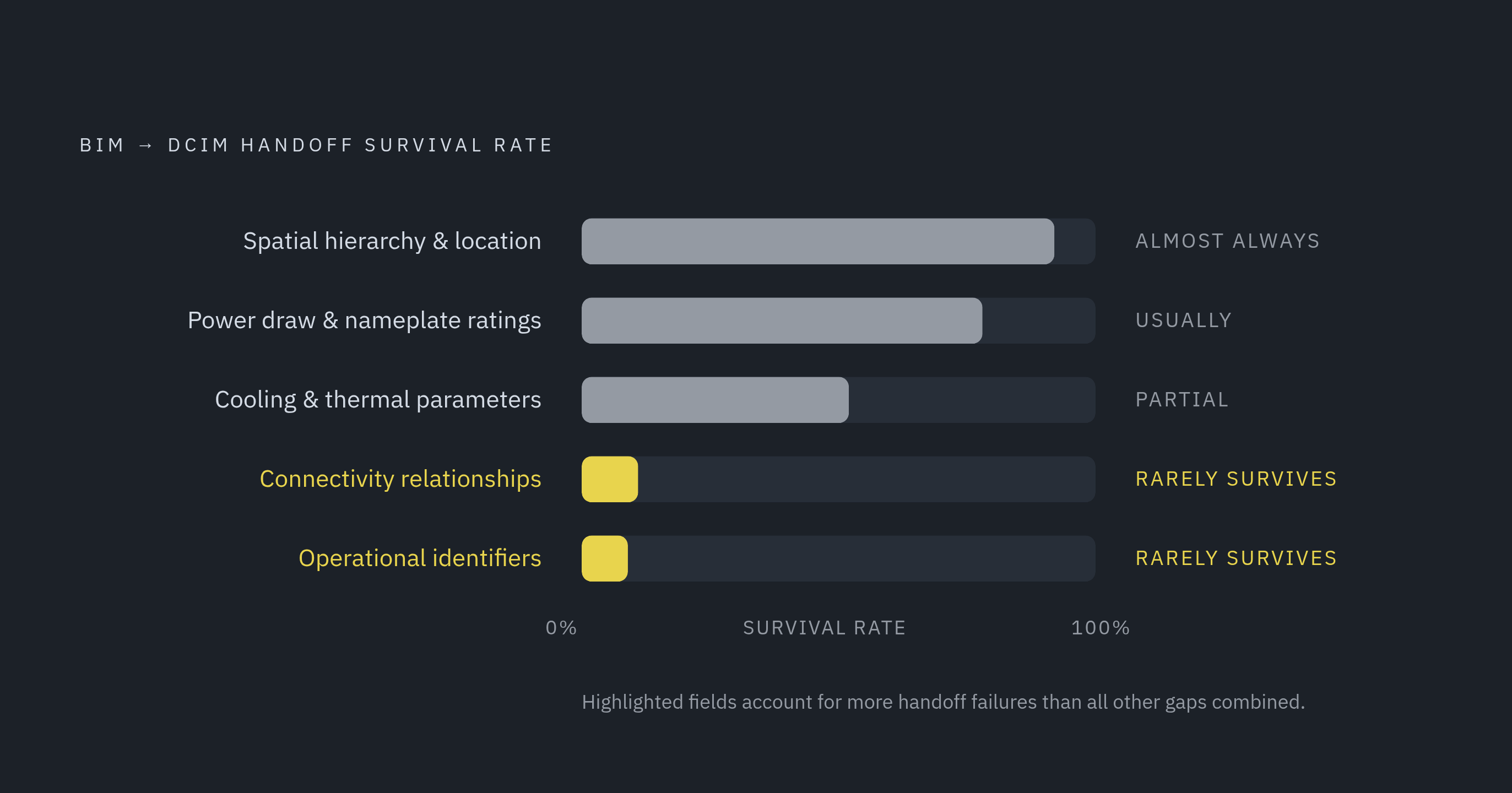
Geometry almost always survives the trip from BIM to DCIM. Connectivity relationships and operational identifiers almost never do, and that's the part I've seen trip up more handoffs than anything else combined.
How LOD and BIM family structure determine whether that data survives
LOD 350 is the line. Below that, BIM elements are placeholders, shapes floating in space, not real data containers. At 350 and up, elements start carrying enough geometric and parametric detail to support both field installation and the data extraction DCIM needs downstream.
Cable trays, busways, patch panels: in general construction BIM, these get modeled schematically all the time, just enough to show they exist. In a data center, that shortcut strips out exactly the elements DCIM needs for connectivity mapping. A high-fidelity LOD 350 or 400 family, built off verified manufacturer submittals, carries precise port locations and connection points, structural anchors and clearance envelopes, and embedded parameters for nameplate ratings and asset tag fields.
Here's the trap: a geometry-only family can look complete in the model and still export with every parameter field blank. DCIM ends up with a shape and nothing inside it.
COBie is supposed to be the bridge that fixes this. A properly structured BIM export to COBie populates the asset type, component, and connection sheets that DCIM's import routines read. But that only works if the parameters got filled in when the family was built, not bolted on as a manual step right before export. More often than not, that's exactly how it goes wrong.
LOD 500, the as-built condition, is the foundation for anything resembling a digital twin tied to live facility systems. Operations teams checking equipment status, power draw, or maintenance history need the model to reflect what actually got installed, field changes and all. The gap between LOD 400 (design intent) and LOD 500 (verified as-built) is where connectivity data and serial numbers most often vanish. Something gets swapped in the field, nobody updates the model, and the handoff record is wrong before day one of operations even starts.
Why power and cooling coordination failures corrupt the asset record before handoff
Redundant power paths, N+1 with one spare capacity unit, or 2N with two fully independent paths, need to show up in the model as distinct assets, each with its own connectivity record. Collapse them into a single representation and the redundancy DCIM is supposed to be tracking is already gone.
Say a busway gets rerouted in the field to clear a clash nobody caught in design. The model rarely gets updated to match. That reroute just changed the upstream and downstream connectivity DCIM is going to inherit, and it'll inherit it wrong.
Soft clashes are the sneakier problem. Nothing physically overlaps, but maintenance clearance gets violated anyway. When a soft clash gets fixed on-site by shifting equipment a few inches, port locations and connection points move with it. Those shifts need to make their way back into the BIM parameters. Usually, they don't.
Hot aisle and cold aisle containment, validated only inside the model without checking against the actual rack layout on the floor, produces thermal data that's wrong from the start. Discipline-specific clash detection, power against cooling, cable tray against structure, run against families with embedded parameters, catches more than geometry problems. It catches data integrity problems too, if anyone treats a clash resolution as a trigger to update parameters rather than just fix the shape.
A model can sail through coordination review and still carry unresolved field changes underneath it. DCIM inherits the design intent that got drawn, not the reality that got built.
Spatial hierarchy: the organizing structure that makes every other data field locatable
DCIM's ability to auto-place assets based on position depends on one thing: the hierarchy has to already exist, fully populated, in the incoming data. Campus, building, data hall, room, row, rack, U-position, each level needs its own structured field, not a naming convention buried inside a text string on a tag somewhere.
Skip this and things fail quietly. Capacity planning at the row or hall level means adding up power draw across every asset in that group; miss a few spatial assignments and the math just breaks. Fault isolation, figuring out which assets sit downstream of a failed component, requires DCIM to walk the hierarchy like a tree; gaps in the tree mean the walk stops short. Work order routing, sending a technician to the right rack in the right hall, depends on a spatial address that actually matches the physical building.
A common failure here: BIM models use architectural room names, DCIM uses operational naming conventions, and the two don't match up. The spatial data is technically there. It just can't be mapped without someone building a translation layer by hand after handoff, usually under time pressure, usually imperfectly.
Agree on DCIM's spatial naming schema before BIM families get built at all. Embed it as a parameter from day one, and check it against DCIM's import template before the model ever leaves the design team's hands.
BMS, EPMS, and the sensor layer that activates the static asset record
DCIM collectors pull live data from BMS, control systems, and meters over protocols like BACnet, Modbus, OPC DA, and SNMP. None of that live data means anything unless it can attach to the right asset record, and that record has to already exist with the right identifier waiting for it.
Every monitored point in BMS or EPMS needs to link to an asset record in DCIM through a shared identifier. If the tag in the BMS doesn't match the asset tag in the DCIM record that came from BIM, the data stream just floats there, unattached to anything.
Standardizing BMS, BAS, and EPMS architecture across multiple sites cuts down on variability and shortens timelines, but only if the asset data standard travels intact from BIM through DCIM and into BMS and EPMS. Break the link anywhere along that chain, and here's what happens: power meter readings show up in DCIM with no PDU to attach to, so capacity numbers become guesswork. Thermal sensor data can't tie back to the rack it's watching, so hot spot detection loses resolution. Alarm events reference device addresses that don't exist anywhere in DCIM, so staff end up manually hunting down the physical asset every time an alarm fires.
The structured asset record from BIM isn't just a starting inventory. It's the index every operational data stream gets filed under afterward. Get it wrong at handoff, and every integration built on top pays a correction cost later, usually a bigger one than fixing it up front would've been.
What a DCIM-ready handoff package actually contains
The handoff package isn't a model file. It's a structured data export, checked against DCIM's import schema, before the project closes out.
It needs a COBie export with every component, type, attribute, connection, and space sheet fully populated, not geometry dumped into IFC with blank parameter fields sitting underneath it. It needs an asset register DCIM can actually take in: one row per physical asset, with operational identifier, full spatial address, power parameters, connectivity relationships, and commissioning date all attached. It needs a connectivity schedule, port-level mapping for power (circuit to PDU to rack) and data (patch panel to switch to rack), usually the single piece missing from handoff packages I've seen. It needs a nameplate data set, manufacturer, model, serial number, hardware revision, warranty expiration, sourced from approved submittals rather than catalog sheets. And it needs an as-built spatial model at LOD 500, coordinates reconciled against whatever spatial naming convention DCIM agreed to at the start.
Before handoff, run the asset register against DCIM's import template. Flag every row missing a required field, and resolve it against the as-built model, not the design-intent one. Then ask a simple question: can operations import the package and get a working asset hierarchy, power chains, spatial assignments, identifiers and all, without a single site visit to double-check what they were handed? If the answer's no, the package isn't finished.
Tools that connect design, documentation, and handoff into one continuous workflow exist precisely because this data keeps falling through the cracks when it's stitched together by hand from five disconnected sources at the tail end of a project. Archil Labs, a data center design automation platform that runs layouts, documentation, RFIs, and structured ops handoff inside a single connected workflow, is one example built specifically to close that gap.
How the handoff standard changes as rack density and AI workloads raise the stakes
Hyperscale rack density is already well past what most facilities were built to handle five years ago, and AI workloads are pushing power and cooling requirements higher still. Standard builds at $10 to $12 million per megawatt are getting outpaced by AI-ready facilities running $20 million or more, and that jump isn't just bigger transformers and denser racks. It's the asset data standard having to hold up under conditions with far less room for error.
At higher density, a missing connectivity record or an unlinked thermal sensor stops being a minor inconvenience. It's a blind spot in a facility where a single rack can draw as much power as an entire row used to. The handoff standard that was optional at 5 kilowatts a rack becomes mandatory at 40 or 80. The fields don't change. What changes is how much it costs to get them wrong.